The Customer Loop · number capture
Everyone who scans your code becomes a number in your Customer Ledger
The visitor leaves a name and a number in seconds, gets a welcome in your company’s name, and lands in your Customer Ledger with the branch, the employee and the source.
On Business Basic · 46 SAR a month, billed yearly
Fnoon Al-Majd Advertising — a real customer page on AurCard
- The Customer Loop
- The path that turns a visitor into a returning customer: they scan, leave their number with consent, are saved in the company’s ledger, and receive an offer from its number.
- The Customer Ledger
- The company’s contact list: import, groups, the source of every number, and consent.
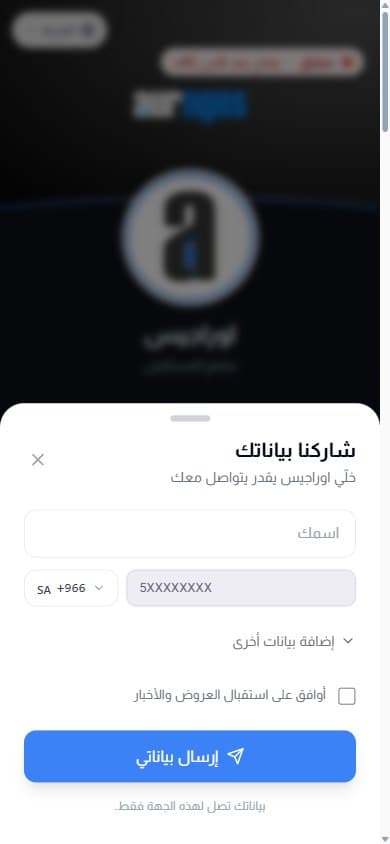
Whoever scans your code is interested at that moment — a minute later they are gone. AurCard politely asks for a name and a number, once, on your shop page or on any employee card. They get an instant welcome in your company’s name: on WhatsApp when your company number is linked (on every plan), or by SMS under your sender name from your credit if you switch it on. The number is kept in the company’s Customer Ledger — not on the employee’s phone — with who collected it, from which branch, and how. From there you message them with their consent, and you know, in numbers, which code and which employee actually bring customers.
How it works
- 1
They scan the code
The storefront sticker, a code on the table, or an employee card — any code that opens your page.
- 2
They leave a name and a number
A small sheet appears after a few seconds: name and mobile only, e-mail optional. Someone who has shared is never asked again.
- 3
They get a welcome, you get the reports
An automatic welcome from your company — on WhatsApp when your company number is linked, or by SMS if you switch it on — and the number in your Customer Ledger with its source — so you know how many came from the storefront, from each employee, from each branch.
Why it matters
The customers belong to the company
A number your employee collected is kept in the company system, and stays there the day they leave.
You know where every number came from
A report by source: the sticker, an employee card, an import, a manual entry. Which branch deserves a second sticker becomes a number, not an impression.
Consent on record
The offers box is not pre-ticked, and what the visitor chooses is stored with its time — so you only message those who said yes, and you can prove it.
It does not nag the visitor
Asked once, closed with one tap, and never shown again to someone who shared or declined. A visitor who only wanted to call finds the button right there.
Common questions
- Is the visitor asked on an employee card too?
- Yes. The number reaches the company’s Customer Ledger and the employee’s own list together, credited to the employee who collected it.
- Can I turn the ask off or change the message?
- From the company settings: on or off, when it appears, and the welcome text. The welcome goes out on WhatsApp when your company number is linked (on every plan), or by SMS under your sender name from your credit if you switch it on.
- And once the number is in the ledger?
- File it in groups, message it with your offers on WhatsApp from your own number with consent, and reply from one inbox. If they write outside hours, the auto-reply answers with your times — those three are Company WhatsApp, included in every plan.
Available on the company plans (Business Basic and Business Pro). See pricing