NFC Sticker Maintenance and Lifespan
An NFC tag has no battery and no moving parts, but installation and environment decide its life. Here is what damages one and how to check yours.
Business Basic plan · 46 SAR a month, billed yearly
An NFC tag contains no battery, no moving parts and nothing that consumes itself in use, which means the number of times it is read does not meaningfully wear it out — a tag tapped fifty times a day does not degrade faster than one tapped weekly. What ends its life is physical and environmental damage: a sharp bend severing the copper antenna, sustained heat, moisture where the tag is not sealed, and above all adhesive failure. Which means most tags that "stop working" in shops have not failed technically at all; they fell off, got covered, or peeled.
What actually ends a tag's life
It helps to order the causes by real frequency rather than by what comes to mind first.
Adhesive failure is the leading cause by a wide margin. The tag lifts at the edges and falls, or is pulled off during cleaning. None of this involves the chip.
Being covered is a second cause rarely counted: a menu placed on top, a napkin holder, a plate. The tag is perfectly intact but does not exist as far as the customer is concerned.
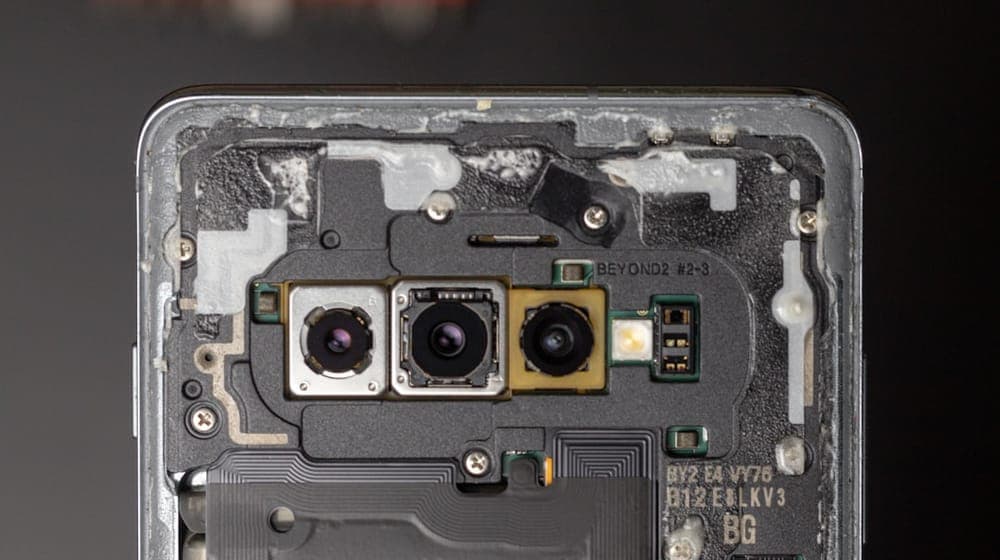
Sharp bending severs the fine copper antenna. This happens to cards carried in back pockets far more than to fixed stickers.
Sustained high heat harms the chip. A tag on a glass shopfront in direct sun through a Riyadh summer is a genuinely hostile environment.
Liquids damage unsealed tags, which is a daily issue in food service.
Why tags do not "run out"
A recurring question: does a tag have a limited number of reads?
 Photo by Alvaro Reyes on Unsplash
In normal use the chip is only read, and reading does not alter its contents. Writing is the operation with a maximum cycle count, and that happens once at programming and never again.
The practical consequence is that a tag installed in a protected position and never reprogrammed can remain serviceable for many years. This inverts how to think about maintenance: the question is not "when does it expire?" but "is it still in place and working?"
Periodic checks: two minutes
The most important preventive measure is also the simplest: tap your own tags regularly.
Every fortnight in busy premises, monthly elsewhere. The check covers three things:
That it is still firmly attached — run a finger around the edges, since lifting starts there.
That the tap works — bring your phone close and confirm the page opens.
That the destination is right — confirm it opens your page and not another. This catches deliberate substitution.
Add a fourth check for the printed QR code: scan it from half a metre and confirm it is still crisp.
The numbers reveal a fault before anyone tells you
This is the most useful practical point here: customers do not report broken tags. They try once, it fails, they move on. Two months can pass before anyone notices.
The answer is to watch open counts. A sudden sharp drop for one tag is rarely coincidence — it signals that the tag fell, got covered, was damaged, or the furniture it was on moved.
This is a further reason to give each position its own link. An aggregate figure cannot tell you which tag failed; separated figures point at the exact spot.
Cleaning: where tags get destroyed unintentionally
In restaurants, cafés and salons, daily cleaning is the greatest threat to your tags — and a preventable one, addressed by a single instruction to the cleaning team.
No abrasive cleaners and no rough sponges on the tag itself. A damp cloth only.
Do not wipe towards the edges. Work from the centre outwards, because repeated wiping towards an edge lifts it over time.
Do not spray cleaner directly onto it. Spray the cloth instead. Cleaner seeping under the edges weakens adhesion quickly.
Most adhesive failures in shops trace to exactly this, rather than to tag quality.
Saudi shop conditions: specific considerations
Local conditions add two factors worth attention.
Heat and direct sun. A tag on a glass front or an outdoor table through a Riyadh or Dammam summer takes high temperatures for many hours daily. This weakens the adhesive well before it harms the chip. Prefer indoor positions, or use outdoor-rated tags where necessary.
Dust. In dusty periods a thin layer builds up, weakening adhesion at installation and obscuring the tag visually. Installing on a dusty day without cleaning the surface thoroughly is a recipe for failure within a week.
Air conditioning and condensation. Repeated transitions between outdoor heat and indoor cooling cause condensation on glass surfaces, which degrades adhesion over time.
When to replace rather than repair
A tag is a relatively cheap item, and trying to save one usually costs more time than it is worth.
Replace immediately if it has begun lifting at more than one edge, if it now takes two attempts to work, if the printed QR code is damaged, if it has deep scratches, or if it has been repeatedly wetted.
Do not try to re-stick a tag that has been removed. The adhesive loses its strength after removal and a re-applied tag falls within days. And if you must move one, be aware that removal itself can sever the antenna.
Practical advice for shop owners: keep two spare tags, programmed and locked, in a drawer. Replacement then takes two minutes instead of waiting on an order.
Carried cards differ from fixed stickers
A personal card in your wallet faces harsher conditions than a sticker fixed to a table.
Constant pressure in a back pocket, bending when you sit, abrasion against keys and coins — all take a gradual toll. Cards made from rigid materials tolerate this considerably better than thin laminated ones.
The rule: carry an NFC card in the card slot of a wallet rather than loose in a back pocket, and test it every few months instead of discovering a fault in front of a client.
If a tag is damaged, the loss is small
The good news is that a damaged tag means no data is lost.
The tag does not hold your information; it holds a link to it. Your page and its contents live somewhere else entirely, intact. A new tag is programmed with the same link and everything is as it was.
That makes the true cost of a damaged tag the price of a small object plus two minutes of work — no more. It is a fundamental difference from systems that store data on the object itself.
What a tag stores and why is covered in NFC security: what can actually be read.
A maintenance routine worth adopting
For a mid-sized shop, this is enough:
Weekly: a quick look — are the tags in place and uncovered?
Fortnightly: an actual tap with your phone to confirm they work.
Monthly: a look at the figures per position to spot unexplained drops.
Every six months: a review of the positions themselves — are they still the best ones after changes to layout and customer flow? Placement is covered in where to place NFC stickers in your shop.
The whole routine takes under ten minutes a month, and it prevents the worst case: a tag dead for two months while you conclude the technology "did not work in my shop".
With AurCard you can track opens per tag, so a fault appears in the numbers before it reaches you through a customer.
Read next
The smart sticker: where to put it, and why the storefront and the till give different numbers
Three places, three different intentions in the customer’s head — and how to read each sticker’s numbers to know which deserves a second one.
NFC Cards for Teams and Employees
NFC cards for a team mean one identity, central updates, and instant deactivation when someone leaves. Here is how to roll them out without chaos.
NFC Security: What Can Actually Be Read
An NFC business-card tag holds only a public link and reads nothing from your phone. Here is what can be read, what cannot, and where risk really sits.